
All Multivendor settings are on one page: vendor registration and approval, product approval, limits, commission, delivery statuses, vendor order statuses, shipping rates source and rating period.
Opening the settings
Open Extensions > Extensions, select Ka Extensions and click Edit next to Multivendor. Saving needs the modify permission for the module.
Opening the page also updates the database for a new module version and gives your user group access to the Multivendor admin pages (see Permissions and Security).
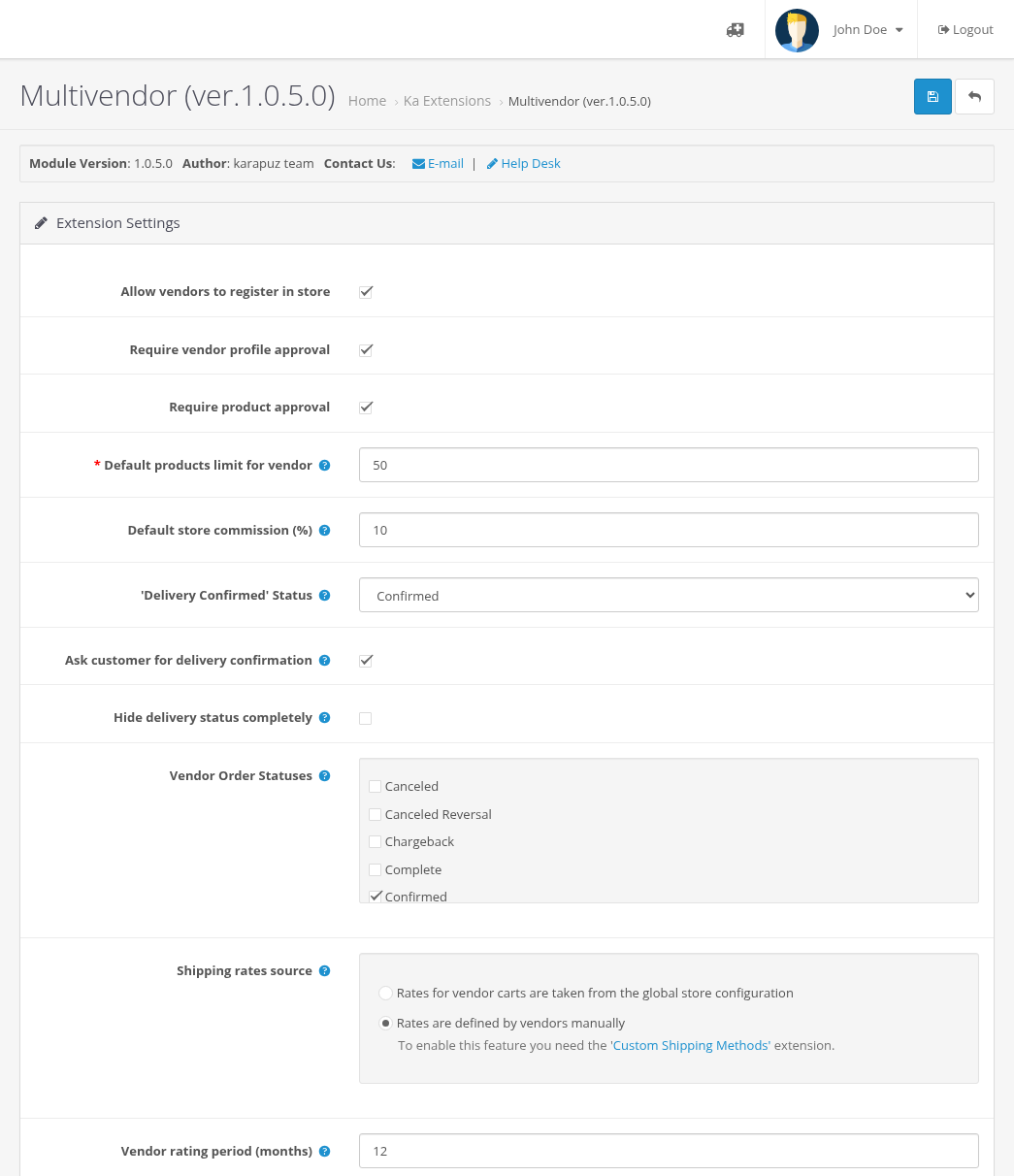
Vendors and products
| Setting | Default | Meaning |
|---|---|---|
| Allow vendors to register in store | On | When it is off, the vendor registration pages show "page not found". Existing vendors keep working. |
| Require vendor profile approval | On | New vendors wait for your approval on Customers > Customer Approvals. When it is off, a new vendor is enabled at once. |
| Require product approval | On | New and changed vendor products wait for your approval. See Product Approval. |
| Default products limit for vendor | 50 | Maximum products that can be created by a vendor. Required. It is copied to new vendor profiles; change it for one vendor in the Vendor tab of the customer. |
| Default store commission (%) | 10 | The commission set for new vendor profiles. Existing vendors keep their own value. |
Delivery statuses
Each vendor order has its own delivery status (see Orders and Vendor Orders).
| Setting | Default | Meaning |
|---|---|---|
| 'Delivery Confirmed' Status | none | The delivery status set when the customer clicks Confirm Delivery. It does not credit vendors. |
| Ask customer for delivery confirmation | On | When it is on, customers see the Confirm Delivery button in their order. When it is off, the button is hidden and the delivery status is still shown. |
| Hide delivery status completely | Off | For stores without physical delivery. Customers, vendors and administrators do not see delivery statuses of vendor orders and cannot change them. |
Vendor Order Statuses
Check the order statuses vendors may set for their vendor orders, for example "Processing" and "Shipped".
- A vendor can change the delivery status only to one of these statuses, and only while the current status is one of them.
- If no status is checked, vendors get no order emails: neither "New Order #..." nor "Status updated for Order #..." when the order status changes, and they cannot change delivery statuses. Check at least one status.
Shipping rates source
- Rates for vendor carts are taken from the global store configuration: every vendor's part of the cart is quoted with your store shipping methods.
- Rates are defined by vendors manually: each vendor creates own shipping methods and rates. This option needs the Custom Shipping Methods extension; without it the option is disabled.
See Shipping per Vendor.
Vendor rating period
Vendor rating period (months), default 12: only approved reviews posted within this number of last months are counted in the vendor rating. Set 0 to count all reviews. Saving the settings recalculates the ratings on their next view. See Vendor Reviews and Ratings.
What is not here
Vendors are credited when the order gets a status of the OpenCart setting Complete Order Status (System > Settings > Edit store > Option). There is no separate Multivendor setting for it. See Commissions, Vendor Balance and Payouts.