
Admin page permissions of Multivendor and how vendors are kept to their own products, orders and files.
Admin user group permissions
System > Users > User Groups has these Multivendor pages:
| Permission | Page |
|---|---|
extension/ka_extensions/ka_multivendor |
The Multivendor settings. |
extension/ka_extensions/ka_multivendor/vendor |
Vendor search in the admin forms (the Vendor field of products). |
extension/ka_extensions/ka_multivendor/vendor_review |
Catalog > Vendor Reviews list. Without access the menu item is hidden. |
extension/ka_extensions/ka_multivendor/vendor_review_form |
The vendor review form. |
extension/ka_extensions/ka_multivendor/product_approval |
The Approve and Decline buttons for vendor products. |
When an administrator with the modify permission for the module opens the Multivendor settings, his user group gets access and modify permissions for the four pages below the settings. Give them to other user groups by hand.
Vendor profiles, products and orders are edited with the usual OpenCart pages, so the usual permissions apply (customer/customer, catalog/product, sale/order, customer/customer_approval).
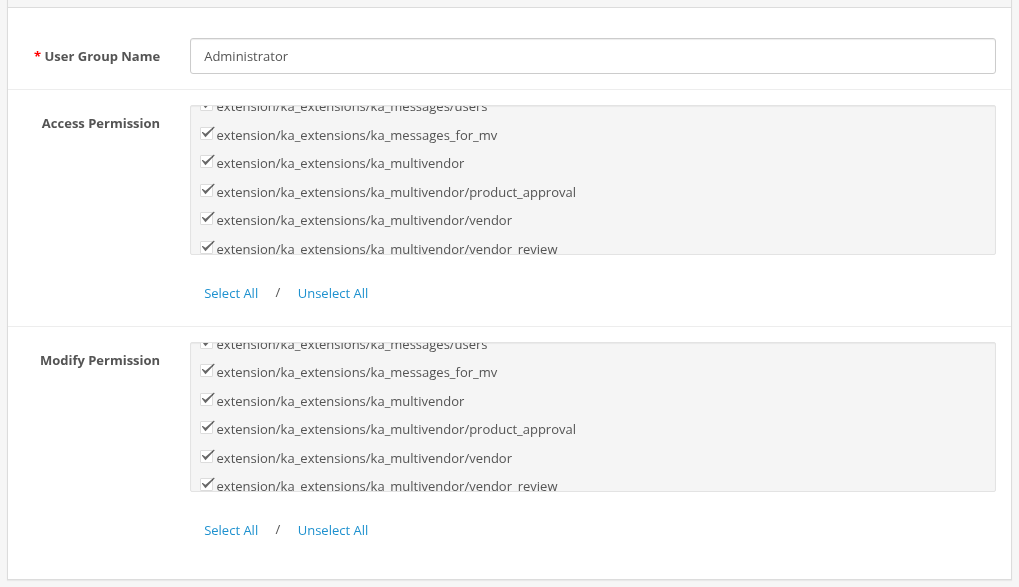
User Group form with the Multivendor permissions checked
What vendors can and cannot access
Vendors work only in the storefront, logged in with their customer account.
- A vendor sees and changes only his own products, vendor orders, shipping methods, reviews and (with Messages for Multivendor) tickets assigned to him.
- A vendor sees customer details (name, email, telephone, shipping address) only of customers who ordered his products. The payment address is not shown.
- A vendor can set only the Vendor Order Statuses of the settings, and cannot change the main order status, the commission or his own vendor status.
- A vendor cannot enable products that are not approved when product approval is on.
- A vendor can place products only into categories open for vendors (Allow For Vendor, also on the parent categories). The store checks it when the product is saved in the form and in the API. A category the product already has is kept, also when it is closed now.
- Vendor images are stored in
image/catalog/vendors/<vendor id>/. The vendor file manager shows only these folders and accepts jpg, jpeg, gif and png files. - An inactive vendor has no vendor menu and cannot use the API.
Content filtering
Vendor texts are cleaned when they are saved:
- product names, descriptions and tags, and the vendor public profile pass an HTML filter (HTML Purifier): scripts and unsafe markup are removed, normal formatting stays;
- review texts and vendor replies are saved as plain text.
API keys
- The API key gives full access to the vendor's products through the Product API. Vendors should keep it secret.
- A vendor creates or replaces the key with Generate in the profile. The old key stops working at once.
- The administrator can change or clear the key in the Vendor tab of the customer.
- Requests of disabled vendors and disabled customer accounts are rejected.
- Use HTTPS for API requests, because the key is sent in the URL.