
Vendor products go through Draft, Waiting for approval and Approved. Approve or decline them with a reason from the product list. This page applies when Require product approval is on (the default).
Approval statuses
| Status | Meaning | Product |
|---|---|---|
| Draft | The vendor has saved the product but has not submitted it. | Disabled, not visible in the store. |
| Waiting for approval | The vendor has submitted the product, or changed an approved product. | Disabled until you approve it. |
| Approved | You have approved the product. | Enabled by the approval; the vendor can disable and enable it. |
| Declined | A draft with your decline reason. The vendor sees the reason and can submit the product again. | Disabled. |
Vendors cannot enable products that are not approved: "Products which are not approved cannot be enabled".
Approving and declining
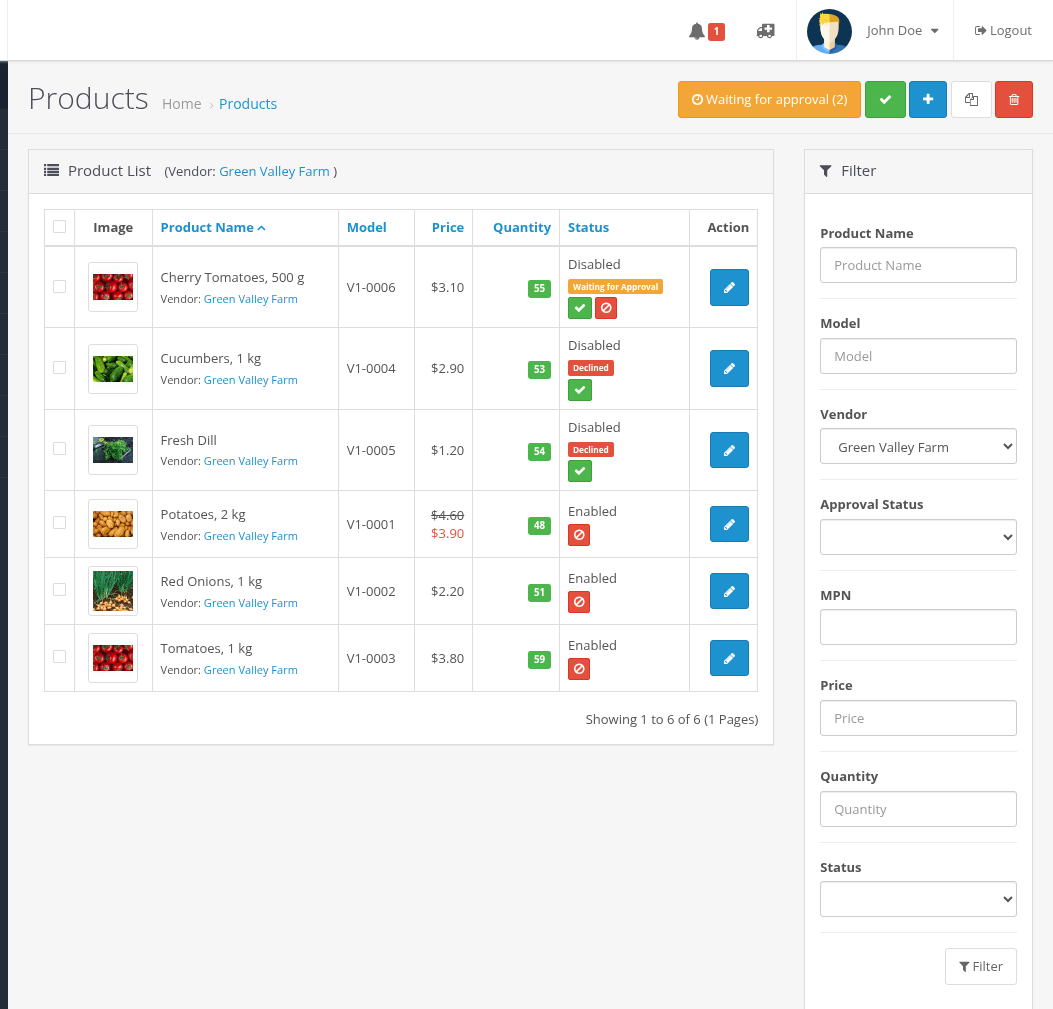
- Open Catalog > Products. The button Waiting for approval (N) at the top shows how many products wait; click it to filter them. The same list opens with the Approval Status filter: Approved, Waiting for Approval, Not Approved (drafts and declined products).
- Approve a product with the green button in its row, or select several products and click Approve selected at the top: "Approve and enable the product(s)?". Approved products are enabled.
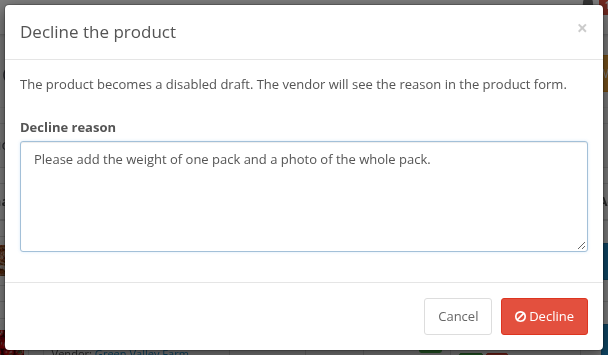
- Decline a product with the red button in its row. Enter the reason (required, up to 2000 characters) in the dialog "Decline the product" and click Decline. "The product becomes a disabled draft. The vendor will see the reason in the product form."
Only drafts and products waiting for approval can be approved; only products waiting for approval and approved ones can be declined.
The product form has an Approval Status row with the same buttons and the decline reason. "Enabling the product approves it": if you set Status to Enabled and save, the product becomes approved.
With Ka Extensions 4.1.1.29 or newer the admin notifications also show "Multivendor: N product(s) waiting for approval."
The vendor gets no email about approval or decline; the result is shown in the vendor's product list and form.
Changes that keep a product approved
A vendor can change these fields of an approved product without a new approval: price, special price, quantity (and Unlimited), minimum quantity, status, weight and weight unit, dimensions and length unit, shipping. Other modules may add their own fields to this list (for example, downloads or license fields).
Any other change (name, description, tags, images, category, attributes, MPN, manufacturer) sends the product back to Waiting for approval and disables it until you approve it again.
A product that waits stays waiting after a plain Save; a draft stays a draft until the vendor clicks Save and Submit for Approval.
When product approval is turned off
With Require product approval off:
- the approval labels, filter, counter and buttons are not shown;
- vendors can enable and disable their products themselves, and new products are visible as soon as the vendor enables them.
Products that were waiting keep their status in the database. If you turn approval on again, they continue from it.
Products added by the API
A product added with the Product API is submitted for approval at once: it is created as Waiting for approval, not as a draft, and it is disabled until you approve it. API updates follow the same rules as a plain Save in the vendor form.