
Every vendor's part of the cart gets its own shipping: from your store shipping methods or from the vendor's own rates with Custom Shipping Methods.
How shipping is calculated per vendor
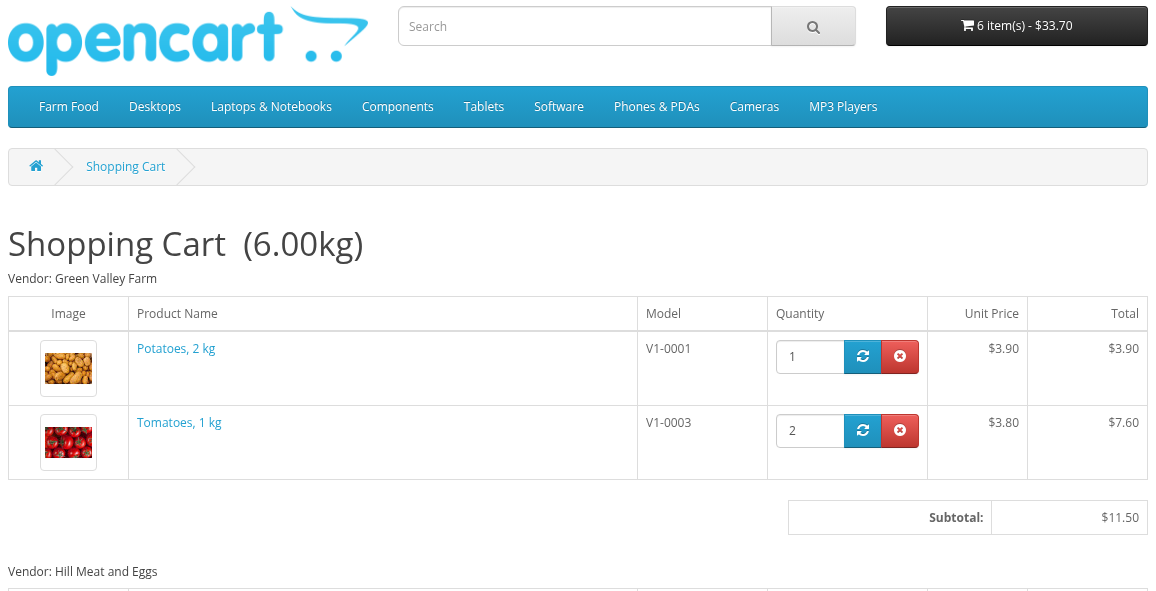
- The cart is split into groups: one group for each vendor, and one group for your store products.
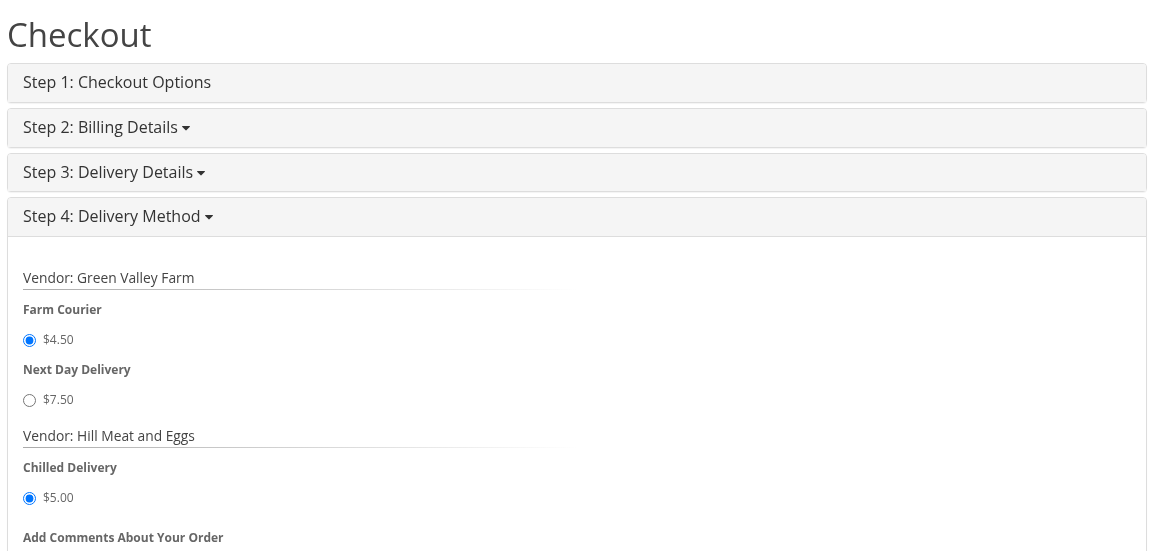
- Each group is quoted separately, as if it were a cart with only these products (their weight, subtotal and quantity), to the shipping address of the buyer.
- The buyer chooses a shipping method for each group.
- A group without products that require shipping gets no shipping method.
- The order total has one line Total shipping: the sum of the chosen methods.
A cart with store products only works as usual in OpenCart.
Global mode
Shipping rates source = Rates for vendor carts are taken from the global store configuration (the default).
Every group, vendors and store, is quoted with your enabled store shipping methods (Extensions > Extensions > Shipping). If Custom Shipping Methods is installed, only methods that belong to the store are used; vendor methods are ignored.
Vendors see "Shipping Methods are Global" in their menu: "Shipping methods and their cost calculation are defined globally by administrator".
Custom mode
Shipping rates source = Rates are defined by vendors manually. It needs the Custom Shipping Methods extension.
- Each vendor creates own methods and rates in My Account > Shipping Methods (see Shipping Methods).
- A vendor's group is quoted only with the methods of this vendor. Your store methods are not offered for vendor products.
- The store group is quoted with your store methods.
- A vendor without enabled methods gets no shipping options, and the checkout cannot be finished for a cart with this vendor's products. Ask vendors to set up shipping before you approve their products.
Cart and checkout
- The cart shows products grouped by vendor: "Vendor: name". The group of your store products is titled with your store name. Products of a vendor account that was deleted are shown under "Vendor: Deleted Vendor".
- The shipping estimate in the cart and the shipping method step of the checkout show a list of methods for each vendor, and for the store group under your store name. "Not required" is shown for a group that needs no shipping, "No shipping methods" for a group without available methods.
- If a group has no available method or no method is selected, the Delivery Method step stops with "Warning: Shipping method required!". The confirm step checks it again: "Shipping method is not selected for '...'".
Managing vendor methods in the admin
Vendor methods are Custom Shipping Methods records that belong to a vendor. In the Custom Shipping Methods list in the admin you can filter methods by vendor, and edit or disable them like your own methods.
