
Product Group Editing is a module for the OpenCart 3 admin panel. It helps when you need to make the same change in many products: set a new price for a product line, add a discount or a special price, put products into a category, add an option with its values or remove an option that you do not sell any more.
Without the module you open and save every product one by one. With the module you do it once:
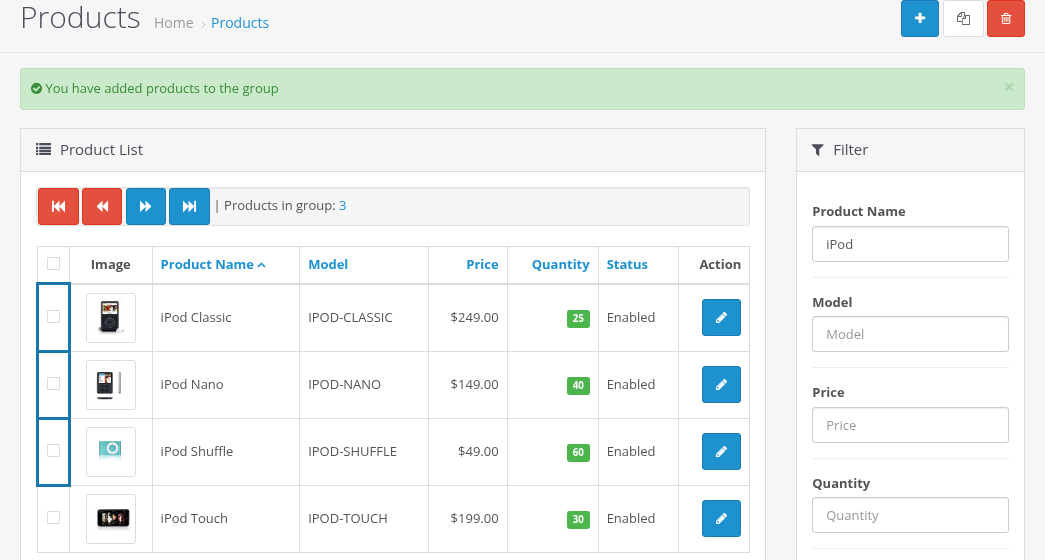
- In Catalog > Products you put the products into a group: select them with checkboxes or add all products found by the filter.
- You open any product for editing. Next to the fields of the product form you now see small checkboxes.
- You change the fields you need, check their checkboxes and click Save.
The product is saved as usual, and the checked fields are copied to every product of the group. Fields that are not checked stay as they were in each product.
Who it is for
- Store owners and content managers who maintain large catalogs: price changes, sales, new categories, shared images, attributes and options.
- Stores with product lines that differ in small details (sizes, colors, models) but share prices, options, descriptions or links.
What can be copied
- Almost every field of the product form: names and descriptions (per language), model, SKU and other codes, price, tax class, quantity, stock and shipping settings, dimensions, weight, status, sort order.
- Links: manufacturer, categories, filters, stores, downloads, related products.
- Rows of the tables: attributes, discounts, specials, additional images, reward points, recurring profiles, layout overrides.
- Options: a single option with its values, all options at once (Replace All Options), or deleting an option from all products.
See Fields by Tab for the exact rules of every field.
The module also adds Group Actions to the product list: add all products of the group to a category or remove them from a category without opening any product. See Building the Product Group.
Key concepts
| Term | Meaning |
|---|---|
| Group | The list of products you have collected in Catalog > Products. Every administrator has an own group, and it belongs to the login session (see Building the Product Group). |
| Edited product | The product you open in the product form. It is the source of the data: the checked fields are taken from this form. It does not have to be in the group. |
| Field checkbox | A small checkbox next to a field label or in a table row of the product form. Only checked fields are copied to the group products. |
| Group products | All products of the group except the edited product. They get the checked fields. |
Requirements
| Requirement | Version |
|---|---|
| OpenCart | 3.0.0.0 - 3.0.5.x. Version 2.0.2.5 was tested on OpenCart 3.0.5.1. |
| Ka Extensions library | 4.1.1.30 or newer (free) |
| PHP | The version required by your OpenCart 3 release |
Product Group Editing is a paid module. It is registered with a license key on the Ka Extensions page of your admin panel, see Installation, Settings and Upgrading.