
Permissions of administrators
The module uses the usual OpenCart user groups (System > Users > User Groups). On installation the pages of the module are added to the group of the administrator who installs it. For other groups tick these pages in Access Permission and Modify Permission:
| Page | Access gives | Modify gives |
|---|---|---|
extension/ka_extensions/ka_messages/tickets |
The menu item Customers > Tickets and the ticket list. | Deleting tickets in the list and in the Ban dialog. |
extension/ka_extensions/ka_messages/ticket |
Reading tickets. | Replies, new tickets, Close, Answered, Verified, properties and notes, Resend, uploading images, Edit / Move / Split / Delete of messages. |
extension/ka_extensions/ka_messages/message |
The dialogs Edit / Move / Split. | (uses the modify permission of ticket) |
extension/ka_extensions/ka_messages/attachments |
Opening attached files and images. | - |
extension/ka_extensions/ka_messages/users |
Choosing administrators in the ticket properties. | - |
extension/ka_extensions/ka_messages/bans |
The menu item Customers > Banned Emails and the list of rules. | Adding and removing rules, the Ban buttons. |
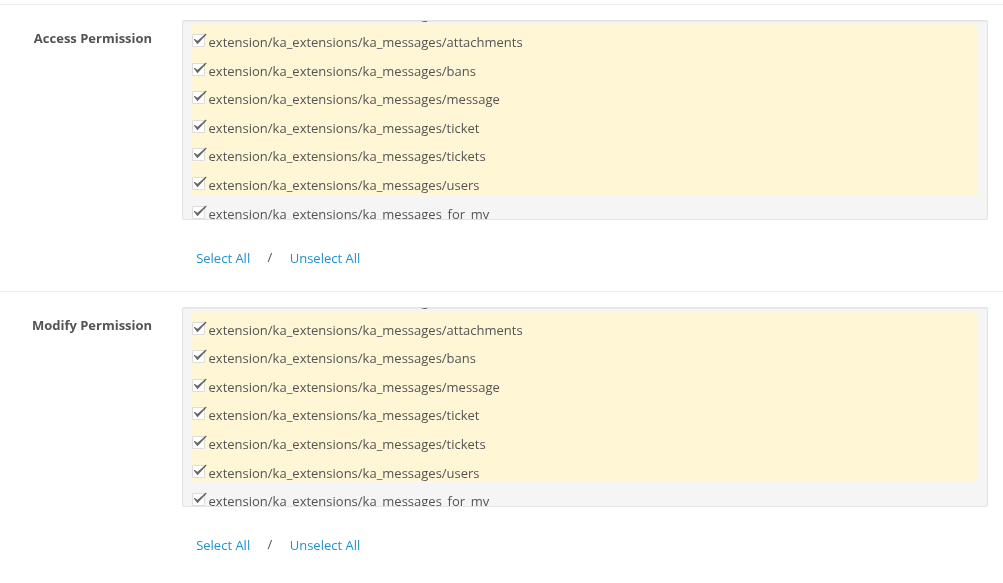
Example: a support agent who answers tickets but cannot delete them or edit bans gets access to all six pages and modify only for ticket and message.
Every administrator who works with tickets needs his own email in System > Users > Users, different from System E-Mail. A reply from the mail client is accepted only from this address.
The two keys of the module
| Key | Where | What it protects |
|---|---|---|
| Secret Key for Cron Script | Module settings | The cron URL. Without the right key the URL only answers "secret_key is not valid". |
| Email signing key | The file system/config/ka_messages.php, created on installation |
The ids of the ticket emails. A reply is added to a ticket only if its id is signed with this key, so nobody can add messages to other tickets by faking email headers. |
Keep both private. Do not publish the cron URL, and do not share the key file.
Keep system/config/ka_messages.php in your backups and copy it when you move the store to another server. If the file is lost or replaced, a new key is created on the next installation, and replies to all emails sent before become new tickets instead of being added to their tickets. The cron log lists such ids as "ids with an invalid hash are ignored".
Customer data
- A customer sees only the tickets where he is one of the customers, and only after his email is confirmed. Opening another ticket by its URL shows "page not found".
- Attached files and images are stored outside the public folders and are shown only by the access rules (see Attachments and Inline Images).
- Images uploaded by customers are cleaned from EXIF and GPS data.
- The Ticket Note and Customer Note are never shown to customers.
- The IMAP password is stored in the store settings like other OpenCart passwords. Use a mailbox that is used only for support.
Logs
| File | Content |
|---|---|
system/storage/logs/ka_messages.cron.log |
Every cron run and every imported, skipped or banned email. |
system/storage/logs/ka_messages.log |
Deleted tickets and messages with the administrator name, moved messages. |
| OpenCart error log | Mailbox connection errors, failed emails, template errors. |