
Tickets are private conversations, so a customer sees them in his account only after he has proved that the email address is his. This page explains the verification of customers and tickets, the contact form and the sources of tickets.
Customer Email Verification
The bundled Customer Email Verification extension adds a confirmed / not confirmed flag to every customer account.
- A customer who registers in the store (registration page, checkout, Multivendor vendor registration) gets the email "Confirm Email Verification" with a link. The link is valid for 24 hours.
- On My Account > Edit Account the customer sees Verification Status and can click Verify Email to get a new link.
- When the customer changes his email, the flag is reset and he has to confirm the new address.
- Forgotten Password also confirms the email: the customer has received the reset link at this address.
- An administrator can set the flag in Customers > Customers > Edit, field Verification Status.
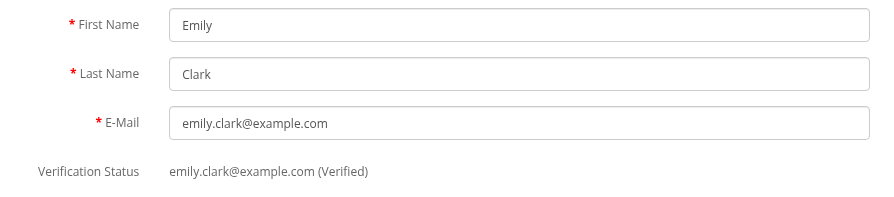
Accounts created automatically from emails (see How Emails Become Tickets) are not confirmed and do not get the verification email. Such a customer confirms the address with Verify Email or Forgotten Password when he first logs in.
What an unconfirmed customer can do
My Account > Tickets and the ticket pages are open only to customers with a confirmed email. Others see: "Please verify your email address before you can access support tickets under your account. To get a verification email, open 'Edit your account information' and click 'Verify Email'." Writing by email and the contact form work without confirmation.
The contact form
With the module the Contact Us form creates a ticket instead of sending an email to the store:
- The visitor enters the name, email and enquiry and sends the form.
- A ticket with the subject "Enquiry name" is created, source Form. If there is no customer account with this email, it is created. The store email cannot be used in the form.
- The visitor sees: "Thank you for your enquiry! Our team has received your message and will review it carefully. You can expect a response within 72 hours..." The text is in
catalog/language/en-gb/extension/ka_extensions/ka_messages/language/information/contact.php; change it if you answer faster. - The assigned administrator gets the email about the new ticket; the visitor gets the confirmation email and can reply to it.

Verified and unverified tickets
Anybody can type any email into the contact form. So a ticket from the form is verified only when the visitor is logged in, used the email of his account and this email is confirmed. Otherwise the ticket is not verified:
- the ticket is not shown in the customer account, even if the owner of the email has an account;
- the ticket list shows a red exclamation icon at the subject, and the emails to the administrator start with "email not verified";
- the ticket emails are still sent to the entered address.
A ticket becomes verified when:
- the customer replies to a ticket email from the ticket address (he has access to the mailbox), or
- an administrator clicks Verified on the ticket page after checking the request.
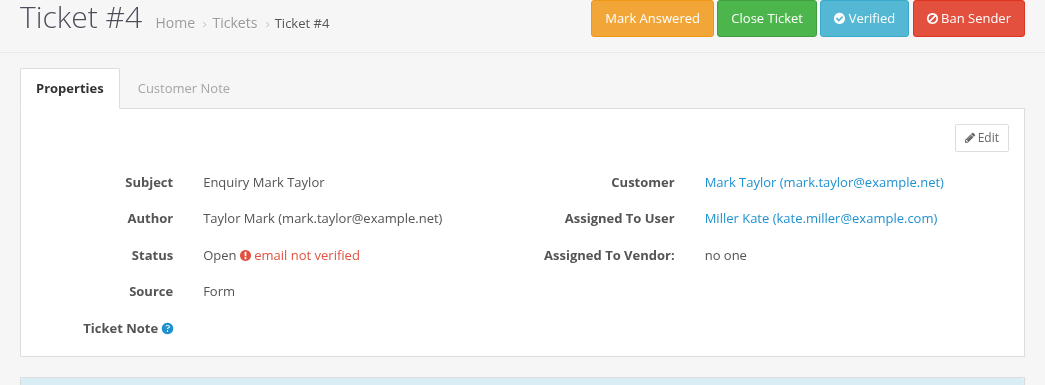
Tickets from emails are always verified: the sender has access to the mailbox. Tickets created in the account, by an administrator or by a vendor are verified too. A message moved or split into a new ticket keeps the verification status of its ticket.
Ticket sources
The Source field on the ticket page shows where the ticket came from:
| Source | Created by |
|---|---|
| An email to the support mailbox. | |
| Form | The Contact Us form. |
| Customer account | My Account > Tickets > Add or Get Support in the order history. |
| Admin | An administrator: Add New in the ticket list, or Move / Split to a new ticket. |
| Vendor | A vendor, with Messages For Multivendor. |