
Task Scheduler comes with several ready tasks. Select them in the Module list of the task form. Tasks of other Ka modules (for example, imports) appear in the same list when those modules are installed.
| Module | Operation | Purpose |
|---|---|---|
| download_file | Download file through FTP, Download file from HTTP URL | Download a file to the store, optionally unpack it and start another task |
| request_url | Request page URL | Open a URL by schedule |
| refresh_currencies | Refresh Currencies (Opencart Routine) | Update currency rates with the rate source selected in OpenCart |
| update_currencies | Update Currencies | Update currency rates from the European Central Bank |
| send_log | Send error log to admin | Mail new error log records to the store email |
| sample_task, test_multi_step | - | Test tasks |
Download file (FTP or HTTP)
Downloads a file and saves it inside the store folder.
Parameters of Download file through FTP:
- FTP Server URL (required): only the host, for example
ftp.mysite.com. Do not add a protocol or port. - FTP Username (required) and FTP Password.
- Path to file on FTP server (required), for example
/my_files/data.csv.
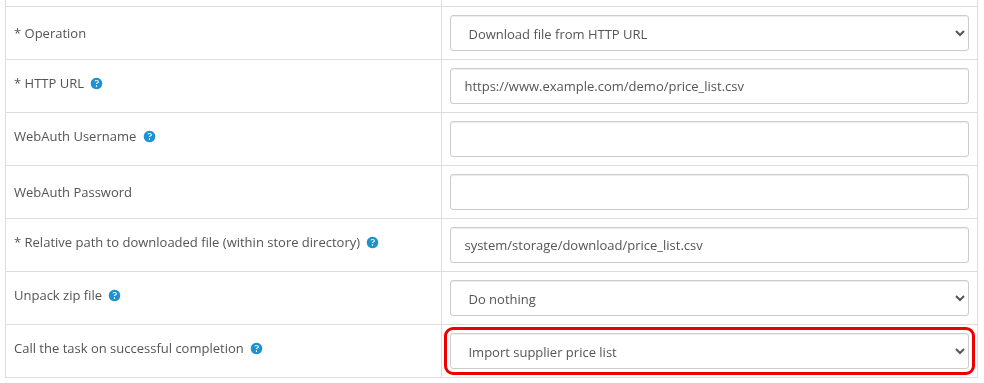
Parameters of Download file from HTTP URL:
- HTTP URL (required), for example
http://www.example.com/downloads/stock.csv. Redirects are followed. - WebAuth Username and WebAuth Password: optional, for URLs protected with HTTP authorization.
Common parameters:
- Relative path to downloaded file (within store directory) (required), for example
downloaded/file.csv. The path is counted from the store root (the folder withadmin/,catalog/andsystem/). Missing folders are created. An existing file is replaced. Paths with..or leading outside the store folder are not accepted. - Unpack zip file: Unpack archive extracts a zip archive into the folder of the downloaded file.
- Call the task on successful completion: the list shows the import tasks you have created (tasks with the import operation of a Ka import module). The selected task runs right after the download.
Example: download a supplier price list every night and import it with CSV Product Import.
- In CSV Product Import, save an import profile that imports the file
downloaded/stock.csv. - Create a task with the module csv_product_import, the operation Import and this profile in Import Profile. Clear Active if the import should run only after the download: a called task runs even when it is not active.
- Create a download_file task, Download file from HTTP URL, with the supplier URL, the same path
downloaded/stock.csv, and the import task in Call the task on successful completion. Schedule it every day at 02:00.
The result (file size, success or the error) is shown on the task statistics page.
Request page URL
Opens the URL in Page URL with a GET request, for example to start a feed generation or another script that needs regular calls. The statistics show the page size in bytes, or the error.
Currency rates
Refresh Currencies (Opencart Routine) runs the standard OpenCart rate update:
- On OpenCart 3.0.4.0 and newer it uses the Currency Rate Engine selected in System > Settings > Local (for example ECB or Fixer, enabled in Extensions > Extensions > Currency Rates).
- On older OpenCart 3.0.x versions the standard routine uses the Yahoo service, which does not work anymore. Use Update Currencies there.
- The statistics show the updated currency codes, or a note:
- "Currency Rate Engine is not selected in the store settings (System > Settings > Local)."
- "Currency Rate Engine "..." is not installed or it is disabled in Extensions > Currency Rates."
- "OpenCart before 3.0.4.0 requests rates from the Yahoo service, it does not work anymore. Use the update_currencies task (European Central Bank)."
- "The currency refresh returned an error."
Update Currencies reads the daily rates of the European Central Bank (ECB) itself:
- It works on all OpenCart 3.0.x versions and does not depend on the Currency Rate Engine setting.
- Only currencies that exist in the store and in the ECB feed are updated. Rates are converted to the store default currency.
- It writes ECB rates over the rates of any other source. Do not use it together with another rate source.
- The ECB has not published Russian ruble (RUB) rates since March 2022. If the store default currency is not in the ECB feed (for example RUB), the task reports "Primary currency was not found in rates" and changes nothing.
- The ECB publishes new rates once on working days, around 16:00 CET. Running the task once a day is enough.
Send error log to admin
Mails the OpenCart error log to the store email (or to ADMIN_EMAIL if this constant is defined in admin/config.php) when the log has changed during the last 24 hours. After sending, the log file is renamed with the date added (for example error.log.2026-10-29), so the next email contains only new records. The statistics show "No new records" or "File was sent." with the file size.
To read the error log yourself, see How to see extended error information.
Test tasks
- sample_task finishes at once and reports a sample result. Use it to check that cron calls work.
- test_multi_step runs 5 steps of 5 seconds each. Use it to check that multi-step tasks continue correctly on your server.
These tasks do not change anything in the store. They are also code examples for developers, see For Developers.